

Automation & Quality
Automatic ticket assignment
Updated 2026-09-09
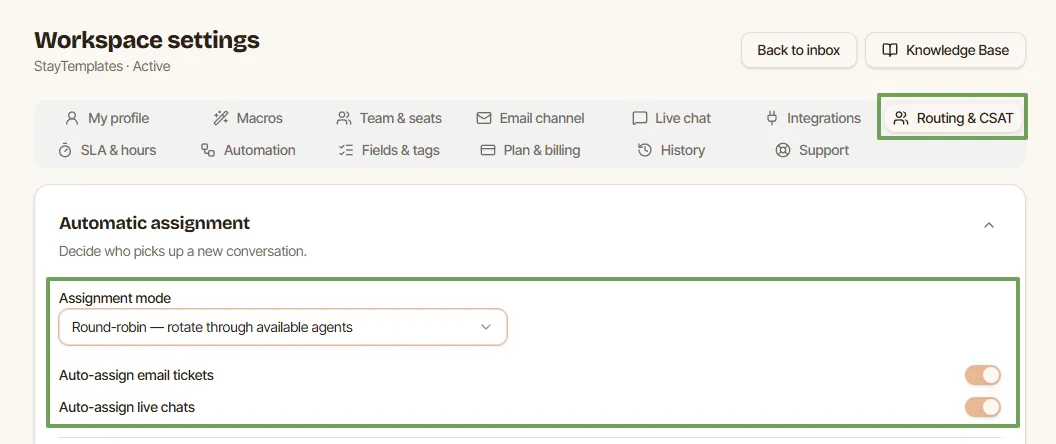
By default tickets arrive unassigned and anybody can pick them up. In Settings you can switch to automatic assignment.
- Round robin distributes new tickets evenly across available agents, one after another.
- Least busy gives the ticket to the agent with the fewest open conversations.
You choose separately whether the rule applies to email, to live chat, or to both. Agents can mark themselves unavailable in their profile, and the rules skip them until they return, which is what you want during holidays or focus time.
Automatic assignment does not lock a ticket. An agent can still reassign a conversation from the ticket sidebar when it needs different expertise.
Step by step
- Open Settings -> Assignment.
- Choose the mode: manual, round robin or least busy.
- Tick the channels the rule should cover, e-mail and live chat.
- Save, then send a test message and confirm the ticket lands on the expected agent.
Good to know
- Only agents who are marked available receive tickets. Ask the team to switch themselves off before holidays.
- If nobody is available, the ticket stays unassigned in the shared inbox instead of disappearing into a queue.
- Least busy counts open conversations, not messages, so a person with one very long thread still gets new work.
- Automatic assignment pairs well with notifications: the agent who receives a ticket gets an alert with a direct link to it.
- Automatic assignment is part of the plans above Starter; on Starter the team picks tickets manually from the shared inbox.